AWS: Backups and persistence
By default every write is appended to a log on disk and the log is synced once a second. You can choose a different persistence mode for each database, and…
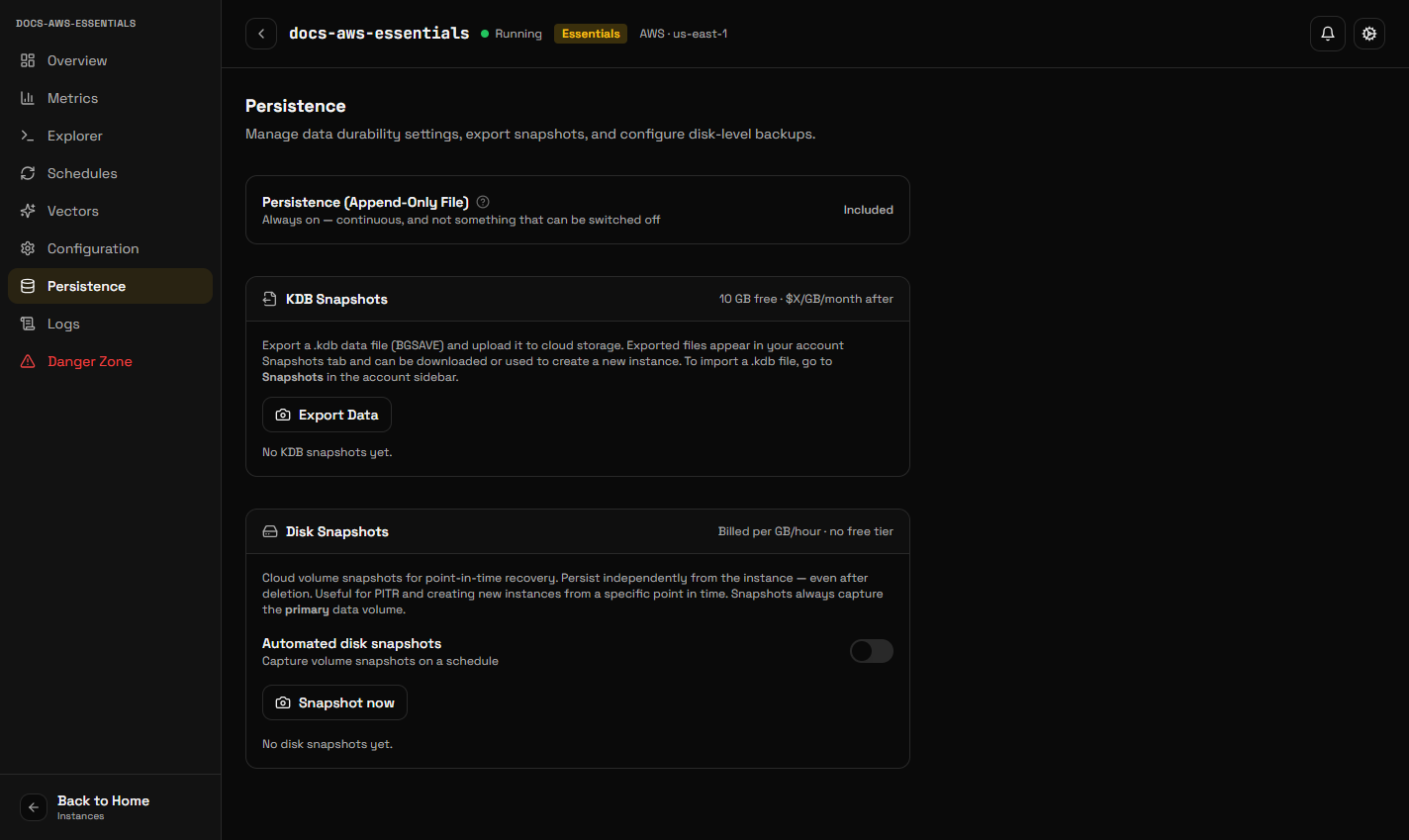
By default every write is appended to a log on disk and the log is synced once a second. You can choose a different persistence mode for each database, and an eviction policy for when its memory is full, under Configuration → Eviction and persistence. Both apply to every node without a restart.
Persistence modes
| Mode | What reaches the disk | What a crash loses |
|---|---|---|
| Append-only log, synced every second (default) | Every write, appended to a log synced once a second | About the last second of writes |
| Snapshot every hour / 6 hours / 12 hours | A snapshot of the whole dataset at that interval, no log | The writes since the last snapshot |
| None | Nothing on its own | Everything since the last snapshot a backup took, or everything if there was none |
With the log, a restarted node replays it and your data is there. With a snapshot mode, a restarted node loads the latest snapshot. Snapshots are taken on the primary; replicas copy the primary as they always do.
Switching the log off takes a snapshot straight away, so the dataset as it was at that moment is on disk. Switching it back on starts a fresh log from the live data.
There is no mode that syncs the log on every write. Redis offers one
(appendfsync always); the KiviDB engine syncs its log once a second in every
release, so it is not offered rather than offered and not done.
The price is the same in every mode: the disk is provisioned and billed the same way whichever you choose.
Free-tier databases run on a shared host without a disk of their own, so they have no persistence and their settings cannot be changed.
Changing either setting needs KiviDB 1.0.5 or later. A database on an older engine keeps the defaults until it is upgraded.
Eviction policy
What the engine does when the database reaches its memory limit:
| Policy | Behaviour |
|---|---|
noeviction (default) | Nothing is deleted; a write that needs more memory is refused with an OOM error |
allkeys-lru / allkeys-lfu / allkeys-lrm / allkeys-random | Delete the least recently used, least frequently used, least recently modified, or a random key, among all keys |
volatile-lru / volatile-lfu / volatile-lrm / volatile-random | The same, among keys with a TTL only |
volatile-ttl | Delete the key nearest to expiring, among keys with a TTL |
These are the engine's own policies, Redis's plus the two lrm ones. A policy
other than noeviction lets the engine delete keys to make room, which cannot
be undone. Free-tier databases use allkeys-lru.
The same settings are available from the API (GET and PATCH /instances/{id}/engine-settings, or eviction_policy and persistence_mode
when creating a database) and from the MCP tools get_engine_settings and
set_engine_settings.
Disk snapshots
Disk snapshots are point-in-time copies of your instance's storage, kept in your account and usable to create a new instance.
In Persistence → Automated disk snapshots you can set:
- Cadence — hourly, daily or weekly
- Retention — how many to keep, or how many days
Take one on demand with Create snapshot. Snapshots are charged for the storage they use.
Restoring
Snapshots → Restore. You can restore into the same instance, replacing its current contents, or create a new instance from the snapshot.
Restoring into an existing instance replaces everything in it. If you are unsure, restore into a new instance and compare before switching your application over.
KDB exports
A KDB export is a portable data file you can download or use to seed a new instance. Create one from Persistence → KDB Snapshots → Export.
Exports appear under Snapshots in the account sidebar, where they can be downloaded or used when creating an instance. Use them to move data between regions, keep an off-platform copy, or seed a development instance from production data.
Exports to your own bucket
KiviDB can copy every export into storage in your own cloud account, and take exports on a schedule: an S3 bucket (AWS), a Cloud Storage bucket (Google Cloud) or a blob container (Azure). The destination's cloud does not have to be the database's; a database on AWS can deliver to Azure.
- Under Settings → Backup destinations, choose the cloud and say where:
- AWS: the account ID, the bucket and a prefix (default
kividb/). - Google Cloud: the bucket and a prefix.
- Azure: the tenant ID, the storage account, the container and a prefix.
- AWS: the account ID, the bucket and a prefix (default
- Make the grant the console shows:
- AWS: create the IAM role it shows, with its trust policy and permission policy. The role may only write under the prefix, and only KiviDB may assume it, with an external ID unique to that destination.
- Google Cloud: run the two
gcloudcommands it shows. They turn on uniform bucket-level access and grant KiviDB's service accountroles/storage.objectCreatoron the bucket, with an IAM condition that limits it to<prefix><code>/, where the code is unique to that destination. Object Creator cannot read, list, overwrite or delete. - Azure: run the script it shows with
bash. It adds KiviDB's app to your tenant if it is not there yet, creates aKiviDB Export Writerrole (write blobs, nothing else) once per subscription, and assigns it to the app on the container with a condition that limits it to<prefix><code>/. It needs Owner or User Access Administrator on the subscription.
- Choose Verify. Nothing is delivered before this passes.
- AWS: KiviDB assumes the role, checks the bucket belongs to that account,
and writes
<prefix>.kividb-verify. - Google Cloud and Azure: KiviDB writes a small
.kividb-verifyfile in the destination's folder, then checks that it may not start a write in a folder named after a code no destination has. A grant that is not limited to the destination's own code fails here, because it would also let another KiviDB organization's destination write into your bucket.
- AWS: KiviDB assumes the role, checks the bucket belongs to that account,
and writes
- On a database's Persistence tab, choose the destination, and optionally a daily or weekly schedule.
Each export lands at <prefix><database>/<time>-<export id>.kdb on AWS, and
at <prefix><code>/<database>/<time>-<export id>.kdb on Google Cloud and
Azure. It is written into your storage, so the copy is yours. The export list
shows each copy's delivery and any error. A scheduled export stays in KiviDB's
storage for 7 days; use a lifecycle rule to expire the copy in yours.
Things to know:
- AWS: if the bucket uses a customer-managed KMS key, also allow the role
kms:GenerateDataKeyon that key. - Google Cloud: each verification writes a new
.kividb-verify-<time>file, because Object Creator cannot overwrite. If your organization restricts IAM members by domain (domain restricted sharing), or the bucket is inside a VPC Service Controls perimeter, it must allow KiviDB's service account. - Azure: a new role assignment can take up to 30 minutes to apply. KiviDB writes over the storage account's public endpoint with Microsoft Entra sign-in, so the account must accept public network traffic. Azure Government and Azure China are not supported.
- Sharded databases cannot deliver to a bucket yet.
Choosing between them
Disk snapshots are the operational backup: fast to restore, automatic on a schedule, tied to the instance.
KDB exports are the portable copy: downloadable, usable anywhere, good for archives and for moving data between instances or regions.
Most people want automated disk snapshots running, and take a KDB export before anything irreversible.