Bring your own cloud: Troubleshooting
Verify (in the connect dialog) and Check again (on a connection) run the same checks, in order, and stop at the first one that fails. The message under the…
Verification failed
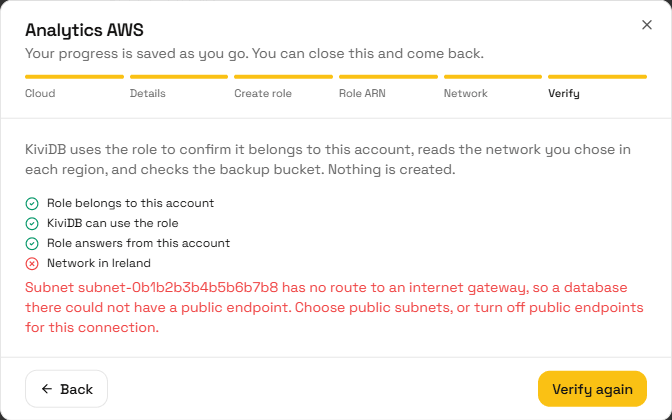
Verify (in the connect dialog) and Check again (on a connection) run the same checks, in order, and stop at the first one that fails. The message under the list says what went wrong. Fix it, then verify again.
Role belongs to this account
The role ARN you pasted is in a different AWS account from the one you entered.
- Copy the RoleArn from the Outputs tab of the stack you created in the connected account, not from a stack in another account.
- If the account ID itself was wrong, disconnect the connection and connect again with the right one.
KiviDB can use the role
KiviDB could not use the role. Usually one of these:
- The stack has not finished. Wait until its status is CREATE_COMPLETE (or UPDATE_COMPLETE).
- The stack was created with different values. Its ExternalId,
KiviDBApiRoleArnandKiviDBWorkerRoleArnparameters must match the values shown on the connection exactly. Update the stack with the right values. - The role was deleted, or the stack was deleted. Create the stack again from the template.
- An organization policy (SCP) or permissions boundary in your account blocks the role.
Role answers from this account
Using the role acted in a different account from the one you entered. This is rare; check the role ARN, and try again in a minute.
Network in a region
One of these, for the region named:
| Message says | What to do |
|---|---|
| A subnet was not found | Check the subnet ID, and that it is in this region and this account. |
| A subnet is in a different VPC | Choose subnets from the VPC you entered, or correct the VPC. |
| Two subnets are in the same availability zone | Keep one subnet per zone. |
| A subnet has no route to an internet gateway | Choose public subnets, or add a 0.0.0.0/0 route to an internet gateway in the subnet's route table. A subnet with no route table of its own uses the VPC's main route table. |
| The VPC or a subnet does not exist | Check the IDs with Edit network. |
| The region is not enabled | Enable the region in the AWS console (Account, AWS Regions), or connect the account again without it. |
| The role cannot read the network | Update the stack to the current template version; see Updating the role. |
Change the VPC or subnets with Edit network on the connection, then check again.
Backup bucket is reachable
KiviDB could not reach the backup bucket. Check that:
- the bucket exists and is in the connected account; a bucket with the same name in another account is refused
- the stack's
SnapshotBucketNameis exactly the bucket you named in KiviDB - no bucket policy, organization policy or permissions boundary denies the role
access to
kividb/
Browser uploads allowed
A warning, never a failure: the bucket does not let the KiviDB console upload
.kdb files into it, so importing a file from the console into this account
is refused. Everything else works. Run the
optional command in step 3,
then check again. See Uploading a .kdb file is refused.
Uploading a .kdb file is refused
When you import a .kdb file into a connected account, your browser uploads it
straight into that account's backup bucket (or Azure storage account), so the
bucket's CORS configuration must allow the KiviDB console's site. Without
that rule the browser refuses the upload before it starts, and the console says
the storage refused it. Verify warns about it as Browser uploads allowed.
The fix is one rule allowing PUT from the KiviDB console (https://kividb.io)
with the Content-Type header (and x-ms-blob-type on Azure). Every way
KiviDB adds it merges it into the rules you already have; none replaces
them.
- Google Cloud and Azure: run the setup command again (it adds the rule), or
with Terraform, run the module's
cors_commandoutput once. On Azure the rule is set on the storage account's Blob service, so it applies to every container in that account. - AWS: run the optional command in AWS CloudShell. The CloudFormation role cannot change your bucket, so the setup does not do it for you.
If the setup printed a warning instead of adding the rule, the person who ran
it could not change the bucket's CORS (Google Cloud: storage.buckets.update
on the bucket; Azure: Owner or Contributor on the storage account), or, on
Azure, the account already has the five CORS rules Azure allows. Fix that and
run it again. Then click Check again on the connection.
My account isn't offered when creating a database
See If your account isn't offered. In short: the connection must be Verified, the database's region must be one of its regions with a verified network, and the database must be on the connection's cloud, not on the free tier, and without private connectivity.
I don't see Cloud accounts in Settings
Every organization has Cloud accounts under Settings. If the tab is missing, reload the page, and check that you are in the organization you expect. Only the organization's owner can connect, change or disconnect accounts.
A database cannot be created or scaled
The machines run under your account's limits. On AWS, check the EC2 vCPU quotas for the region in Service Quotas, and any organization policies (SCPs) that might deny EC2 or Auto Scaling actions. If you recently updated the stack or changed the network, click Check again on the connection.
On Google Cloud, check the region's Compute Engine quotas under IAM & Admin → Quotas: CPUs for the machine family (N2, or N2D when N2 is out of capacity) and in-use IP addresses, one per node. A database that fails with a permission error usually means the custom roles are older than KiviDB's current list: run the setup command again, or apply the latest module, then Check again.
On Azure, check the subscription's vCPU quota for the VM family in the region (Subscriptions → Usage + quotas), and any Azure Policy on the resource group that denies a resource KiviDB creates there. As on Google Cloud, a permission error usually means the roles are older than KiviDB's current list: run the setup command again, or apply the latest module, then Check again.
I cannot connect from my VPC
Disconnect is refused
A connection can be disconnected only when no databases run in it and no backups are stored in it. The message says which. Delete them in KiviDB first.
Google Cloud
A Google Cloud verification lists every check that failed, each with its own message, rather than stopping at the first. Fix them in any order, then verify again. IAM changes in Google Cloud can take a minute or two to apply, so if a check fails right after you ran the setup, wait and verify again.
KiviDB can act as kividb-mgmt
- The service account does not exist. Run the setup command, or apply the Terraform module, in the right project.
- KiviDB may not act as it. The grant of Service Account Token Creator to
KiviDB's service account is missing from
kividb-mgmt. Run the setup command again. - Your organization restricts IAM members to its own domain
(
constraints/iam.allowedPolicyMemberDomains). Then the setup cannot grant KiviDB's service account anything. Ask your organization administrator to allow it for this project, then run the setup again.
Required APIs are enabled
The message names each API that is turned off. The setup command turns them all on. You can also enable them under APIs & Services in the console.
kividb-mgmt has every permission KiviDB needs
The custom roles are missing some permissions. This happens with an older setup, or roles edited by hand. The message names them. Run the latest setup command again, or apply the latest module. Either replaces the roles' permissions with the current list.
Organization policies
- Public IP addresses
- Cause:
compute.vmExternalIpAccessforbids VMs from having public addresses, or allows them only for VMs it lists by name. - Fix: allow external IPs for this project, or turn off public endpoints for this connection.
- Cause:
- Trusted images
- Cause:
compute.trustedImageProjectsdoes not trustprojects/ubuntu-os-cloud. KiviDB's machines boot from Google's public Ubuntu images there. - Fix: add it to the trusted image projects.
- Cause:
- Resource locations
- Cause:
gcp.resourceLocationsdoes not allow one of your regions. - Fix: allow the region, or connect again without it.
- Cause:
Network in a region on Google Cloud
- The subnet was not found, or it is in a different network from the one you named. Check the names under VPC network in the console, then Edit network.
- No route to the internet. The network needs a route for
0.0.0.0/0to the default internet gateway that applies to all instances, not just to tagged ones. New networks have one; check that it was not deleted. - No Cloud NAT. With public endpoints turned off, each subnet needs Cloud NAT in its region.
A disk snapshot fails on Google Cloud
Snapshots of a database in your project are stored in the database's region. A
gcp.resourceLocations policy that allows the region allows them; one that
allows only some other location refuses them. Allow the database's region.
Backup bucket on Google Cloud
-
The bucket does not exist, or it is in a different project. Bucket names are global, so a bucket with the same name in another project is refused.
-
Uniform bucket-level access is off. IAM conditions, which limit KiviDB to
kividb/, need it. Turn it on with:gcloud storage buckets update gs://BUCKET --uniform-bucket-level-accessThen run the setup again.
-
KiviDB cannot read the bucket, or cannot write under
kividb/. Run the setup command again with this bucket. If you granted access by hand, thekividbBackupsbinding's condition must name this exact bucket.
Azure
An Azure verification lists every check that failed, each with its own message. Fix them in any order, then verify again. Role assignments in Azure can take a few minutes to apply, so if a check fails right after you ran the setup, wait and verify again.
KiviDB can sign in to your tenant
- KiviDB's app is not in your tenant. Run the setup command, or have an Entra administrator open the admin-consent link from the connection's Access setup. Adding the app needs an Entra role such as Application Administrator.
- The tenant was not found. Check the tenant ID (Microsoft Entra ID, Overview). To fix it, disconnect and connect again.
- The KiviDB application is disabled in your tenant. Enable it (Enterprise applications, KiviDB, Properties).
- A Conditional Access policy blocks it. Exclude the KiviDB service principal from the policy.
Subscription is reachable and enabled
- KiviDB cannot see the subscription. Check that it belongs to the tenant you entered, then run the setup command for it; it assigns the role KiviDB reads the subscription with.
- The subscription is disabled or past due. Databases cannot be created in it until it is active again.
Resource providers are registered
Register Microsoft.Compute, Microsoft.Network and Microsoft.Storage (Subscriptions, Resource providers). The setup command does it for you.
KiviDB has every action it needs
The message names each missing action. Run the latest setup command (or apply the latest module); it updates the roles in place. If you created the roles by hand, compare them with the list in the setup script.
Azure Policy
- Allowed locations does not include one of your regions: allow it, exempt the resource group, or remove the region from the connection.
- Network interfaces should not have public IPs, or a policy forbidding
Microsoft.Network/publicIPAddresses: exempt the resource group, or turn off public endpoints for the connection. - Not allowed resource types includes something KiviDB creates (virtual machines, scale sets, disks, snapshots, network interfaces, network security groups): allow them for the resource group.
A warning means a policy may apply that KiviDB cannot evaluate, such as a custom policy that denies by location. Check it yourself.
Network in a region on Azure
- The virtual network is in another region. Choose a subnet of a network in that region.
- KiviDB may not place machines in the subnet. Run the setup command with that subnet; it assigns the subnet join role on it.
- The subnet is delegated to a service. Virtual machines cannot use a delegated subnet; choose another.
- Traffic to 0.0.0.0/0 is dropped by the subnet's route table (next hop None). Route it to the internet, a NAT gateway, or a firewall that reaches the internet.
- No NAT gateway. With public endpoints off, each subnet needs a NAT gateway (or a firewall that reaches the internet). A warning about default outbound access means the subnet works today but relies on something Azure is retiring.
vCPU quota
A warning: the subscription has little free vCPU quota in that region. Request more (Subscriptions, Usage + quotas) before creating databases there.
Backup storage on Azure
- KiviDB could not reach the storage account. Check the name; it must be an existing storage account.
- KiviDB may not sign backup links. Run the setup command with this storage account; it assigns Storage Blob Delegator on it.
- The storage account refuses KiviDB because of its network settings. Allow access from KiviDB and from your database subnets.
- The container does not exist, or KiviDB cannot write under kividb/. Run the setup command with this container; it creates the container if needed and assigns Storage Blob Data Contributor on it.