Install on Kubernetes
Run KiviDB on Kubernetes with the open-source kividb-operator. The operator manages a KividbCluster custom resource: StatefulSet pods (master + replicas)…
Install on Kubernetes
Run KiviDB on Kubernetes with the open-source kividb-operator. The operator manages a KividbCluster custom resource: StatefulSet pods (master + replicas), automatic failover, separate master/replica Services, optional ACL, S3-compatible snapshot backups, and a management console.
Chart and operator version: 0.6.0 (images and chart are released in lockstep). The operator, its images and its Helm chart are on Docker Hub (kividb/kividb-operator, chart oci://registry-1.docker.io/kividb/kividb-operator-chart) and on GHCR (ghcr.io/kividbio/kividb-operator, chart oci://ghcr.io/kividbio/kividb-operator-chart), with the same tags. Its default engine is KiviDB 1.1.2 (kividb/kividb:v1.1.2); the samples below pin it with spec.image, which is how you choose a version in your own clusters.
Prerequisites
| Requirement | Details |
|---|---|
| Kubernetes | 1.27+ recommended (kubeVersion >= 1.25) |
| kubectl | Matching your cluster minor or newer |
| Helm | 3.9+ (OCI chart installs) |
| Storage | Default sample requests 5Gi PVC per pod |
Optional: an S3-compatible bucket + credentials Secret for backups; Prometheus Operator CRDs if you enable ServiceMonitors.
Install the operator (Helm / OCI)
helm install kividb-operator oci://registry-1.docker.io/kividb/kividb-operator-chart \
  --version 0.6.0 \
  -n kividb-operator-system --create-namespace
Verify:
kubectl get pods -n kividb-operator-system
kubectl get crd kividbclusters.kividb.io
kubectl logs -n kividb-operator-system deploy/kividb-operator-manager -f
Common overrides
helm install kividb-operator oci://registry-1.docker.io/kividb/kividb-operator-chart \
  --version 0.6.0 \
  -n kividb-operator-system --create-namespace \
  --set gui.enabled=false \
  --set metrics.serviceMonitor.enabled=true
From a git clone (dev / air-gapped)
git clone https://github.com/kividbio/kividb-operator.git
cd kividb-operator
helm install kividb-operator charts/kividb-operator \
  -n kividb-operator-system --create-namespace
Alternative: kustomize (no Helm)
kubectl apply -k https://github.com/kividbio/kividb-operator/config/default?ref=v0.6.0
Or from a clone: kubectl apply -k config/default. Unlike Helm, re-applying kustomize does refresh the CRD.
Create a cluster
Minimal KividbCluster (1 master + 2 replicas by default):
kubectl apply -f - <<'EOF'
apiVersion: kividb.io/v1alpha1
kind: KividbCluster
metadata:
  name: kividb-minimal
  namespace: default
spec:
  image: "kividb/kividb:v1.1.2"
  storage:
    size: 5Gi
EOF
spec.image is used exactly as written; for the Lua, TLS or full build use the tag ending -lua, -tls or -full and set spec.variant to match.
Watch status:
kubectl get kividbcluster -w
kubectl get pods -l kividb.io/cluster=kividb-minimal -w
Connect:
kubectl port-forward svc/kividb-minimal-master 6380:6380
redis-cli -p 6380 ping
Expected phase progression: Pending → Provisioning → Running (image pull + PVC bind).
The minimal sample uses passwordless auth — fine for scratch clusters, not for production.
Operator console (optional)
Enabled by default in the Helm chart:
kubectl port-forward -n kividb-operator-system svc/kividb-operator-gui 8090:8090
# open http://localhost:8090
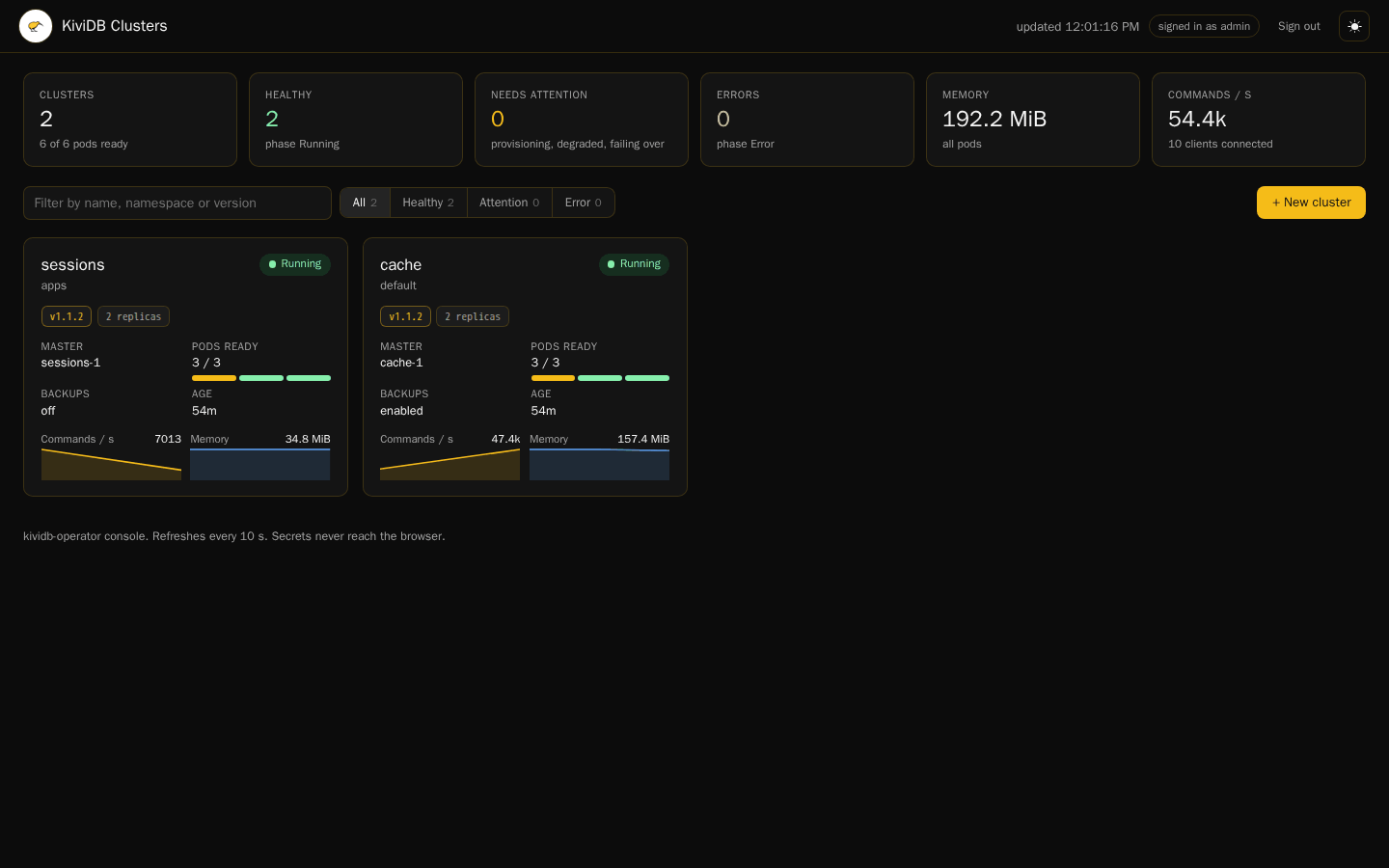
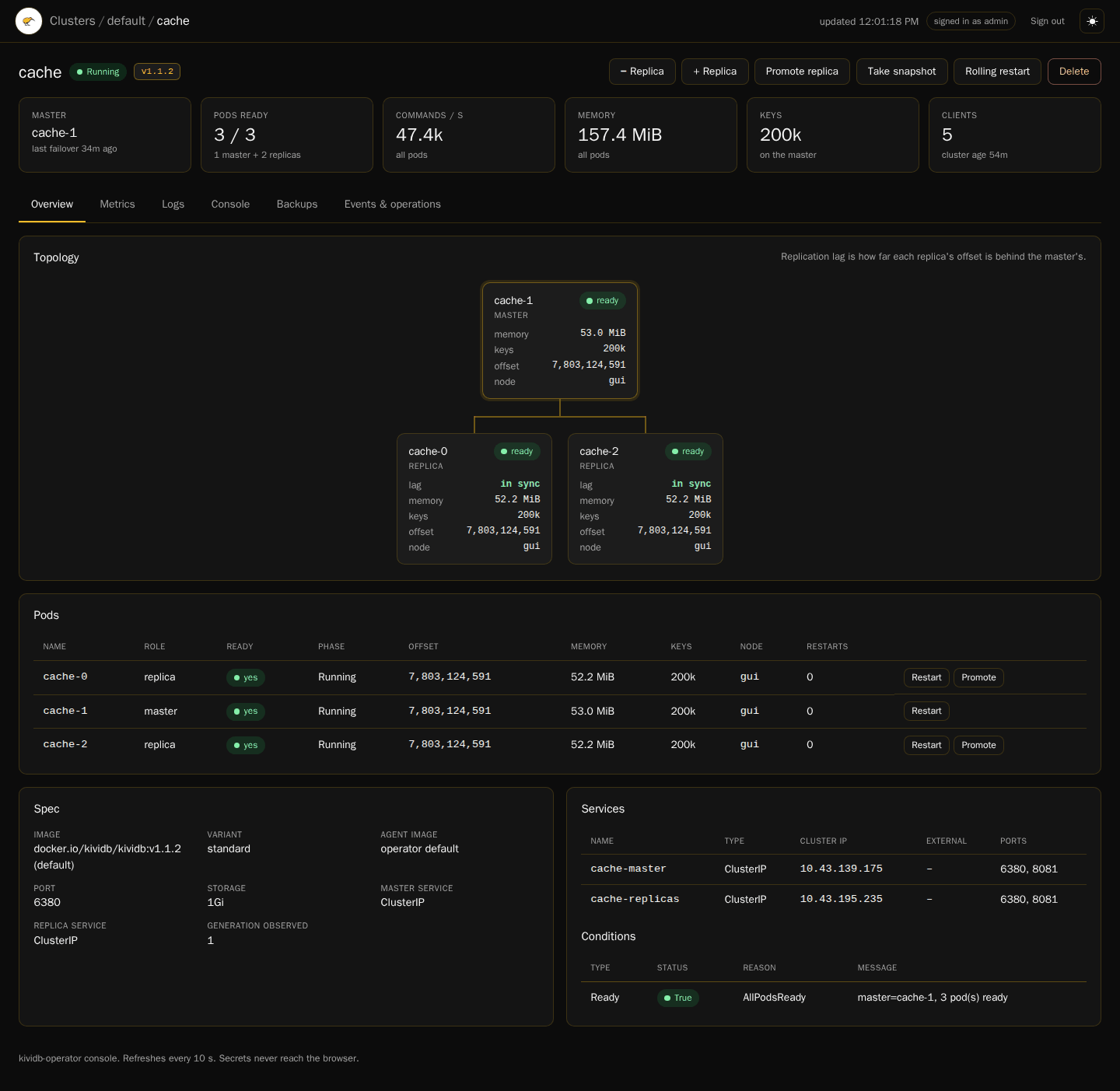
The dashboard shows every cluster's health with totals across all pods, a search box and a health filter. A cluster's page shows its topology (the master, its replicas and how far each is behind), its pods, spec, services and conditions, with tabs for metrics, logs, a RESP console, backups, and events and operations:
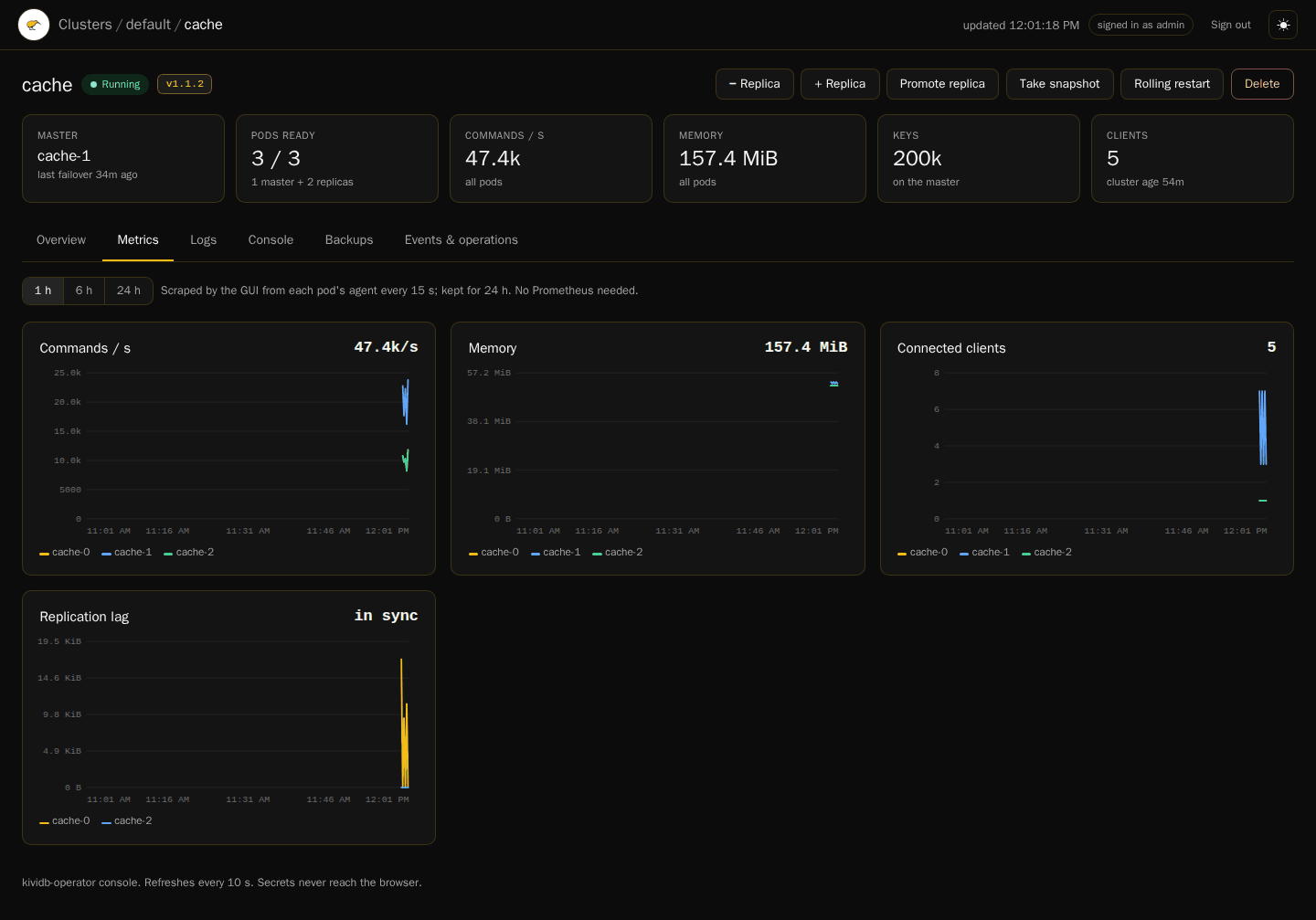
Metrics come from the console's own scrapes of each pod's agent, every 15 seconds, kept for 24 hours; no Prometheus is needed:
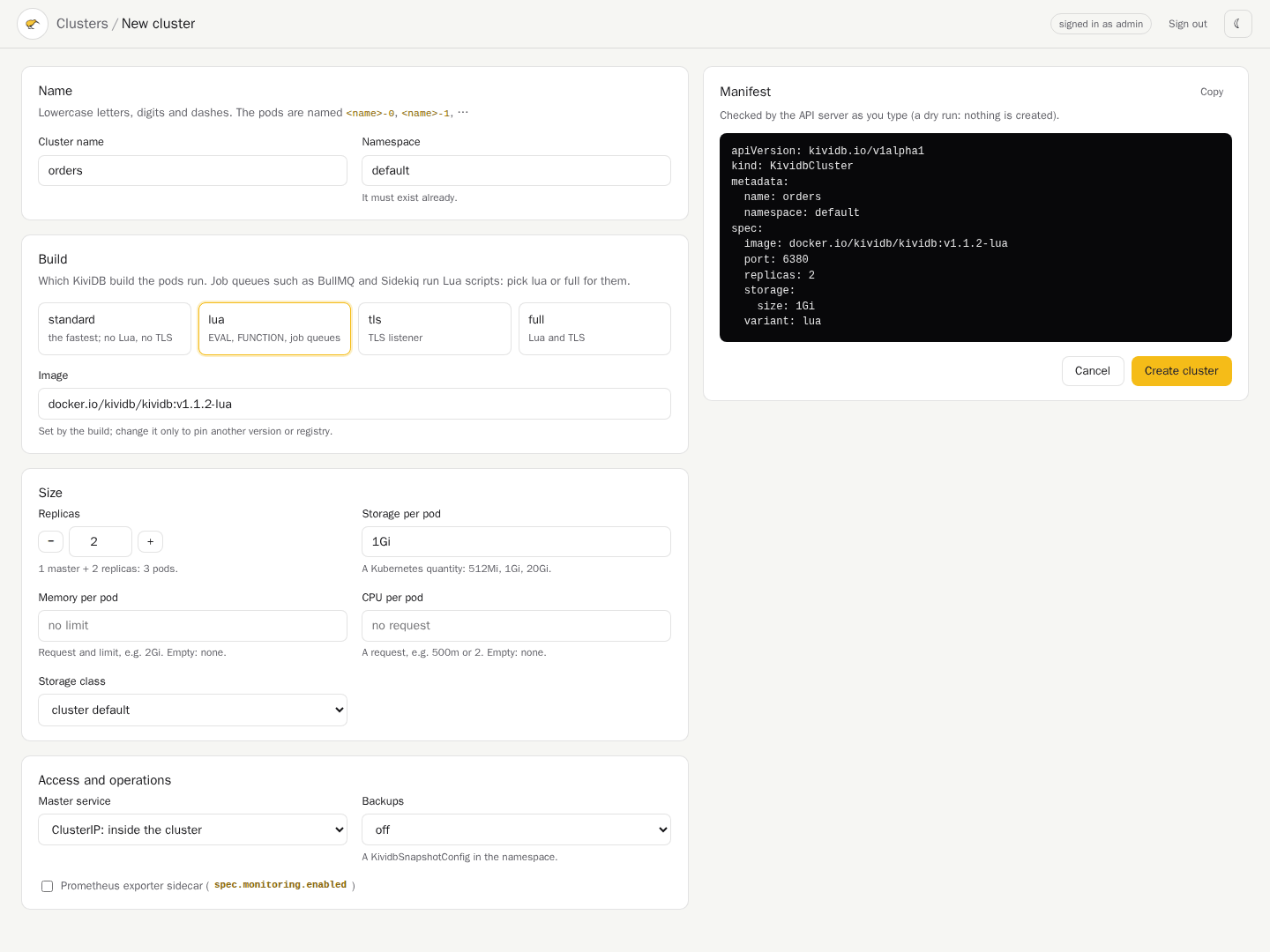
New cluster builds a KividbCluster from a form; the manifest beside it is
the API server's dry run of the form, updated as you type, so a mistake shows
before anything is created, and it can be copied for kubectl apply:
Actions: rolling restart, scale replicas, restart or promote a pod, take a snapshot, create and delete clusters. The console never reads Secrets. It follows the system's light or dark setting until you pick one, and works on a phone.
It is read-only until you give it a login. Create a Secret with username
and password keys and point the chart at it. Without one, every action and
the RESP console are refused, their buttons are disabled and say why, and status
and pod logs stay readable. With one, the console has its own sign-in page and a
12-hour session; ten failed attempts from one address lock it for five minutes.
Scripts can still call its API with Basic auth (curl -u):
kubectl create secret generic kividb-gui-auth -n kividb-operator-system \
  --from-literal=username=admin --from-literal=password='<a strong password>'
helm upgrade kividb-operator oci://registry-1.docker.io/kividb/kividb-operator-chart \
  --version 0.6.0 -n kividb-operator-system \
  --reuse-values --set gui.auth.existingSecret=kividb-gui-auth
Metrics history is kept in memory unless gui.metrics.persistence.enabled is
set (on clusters without a default StorageClass, such as EKS, also set
gui.metrics.persistence.storageClass).
Upgrade the operator
Read the release notes first.
- From 0.5.0 to 0.5.1 or later, a cluster that leaves
spec.imageunset is upgraded to KiviDB 1.1.2, its pods rolled one by one. Setspec.imagefirst to stay on a version. - From any version, a cluster that leaves
spec.agentImageunset rolls its pods onto the new agent image. - From 0.5.x to 0.6.0, with console authentication on, the console signs in on its own page instead of the browser's login box.
Upgrading from 0.4.0 to 0.5.0 rolls every cluster onto the new configuration (bind 0.0.0.0,
which KiviDB 1.1.0's protected mode needs on a cluster without a password) and
moves clusters that do not pin spec.image to KiviDB v1.1.0. Upgrade the
operator first, then change spec.image on clusters that pin an older engine.
With a TLS CA set, KiviDB 1.1.0 requires client certificates: add the directive
tls-auth-clients: optional to keep accepting clients without one.
Helm never installs or updates CRDs, so apply all of them before upgrading the chart:
for crd in kividbaclconfigs kividbclusters kividbconfigs kividbdbops kividbsnapshotconfigs kividbsnapshots; do
  kubectl apply -f https://raw.githubusercontent.com/kividbio/kividb-operator/v0.6.0/charts/kividb-operator/crds/kividb.io_${crd}.yaml
done

helm upgrade kividb-operator oci://registry-1.docker.io/kividb/kividb-operator-chart \
  --version 0.6.0 \
  -n kividb-operator-system
The operator then replaces each cluster's pods itself, one at a time — replicas first, the master last after handing its role to an in-sync replica — so an upgrade costs about a second of refused writes per cluster.
Uninstall
helm uninstall kividb-operator -n kividb-operator-system
This does not delete the CRD or existing KividbCluster data. Full teardown:
kubectl delete kividbcluster --all -A
# destructive: removes every cluster and the operator's other resources
kubectl delete crd kividbaclconfigs.kividb.io kividbclusters.kividb.io kividbconfigs.kividb.io \
  kividbdbops.kividb.io kividbsnapshotconfigs.kividb.io kividbsnapshots.kividb.io
What the operator manages
KividbClusterCRD → StatefulSet (master + N replicas)- Automatic failover to the most caught-up in-sync replica, which never promotes an empty replica over a master that held data
- Rolling updates driven by the operator: one pod at a time, each replica resynced before the next, and a master handover instead of a master restart
KividbDbOps: declarative rolling restartsspec.bootstrapFromSnapshot: start a new cluster from a backupKividbConfigchanges roll the pods;KividbAclConfigchanges reach running pods without a restart- Separate master / replica Services (
ClusterIP/NodePort/LoadBalancer) - ACL users and legacy
requirepassfrom Kubernetes Secrets - Scheduled S3-compatible snapshot backups (CronJob → agent
/backup) - Optional Prometheus metrics (
redis-exporter+ ServiceMonitor) - Scheduling: resources, tolerations, nodeSelector, affinity
Full sample (replicas, ACL, backups, LoadBalancer, monitoring): see config/samples in the operator repo.
Further reading
Versioned operator docs (CRDs including KividbConfig / KividbAclConfig /
KividbSnapshotConfig as of operator 0.2.0) live on this site:
| Topic | Docs |
|---|---|
| Release notes | /docs/operator/releases |
| Install & upgrade | /docs/operator/0.6.0/install |
| Architecture | /docs/operator/0.6.0/architecture |
| Field reference | /docs/operator/0.6.0/configuration |
| Backup / restore | /docs/operator/0.6.0/backup-restore |
| Troubleshooting | /docs/operator/0.6.0/troubleshooting |
| Resource | Link |
|---|---|
| Operator source | github.com/kividbio/kividb-operator |
| Artifact Hub | kividb-operator-chart |